
This examples shows how easily it is to route messages based on message headers using WCF4
For this example I built two similar request-response WCF services with different service contract namespaces. One simply adds the two numbers together while the other service subtracts the two numbers and then returns the result.
A windows form was used as the client that accepts 2 numbers and the type of mathematical operation to perform, either addition or subtraction. Once the type of operation to perform is entered, the message header is updated with the operation and then submitted to the WCF routing service. The routing service reads the header information and reroutes the message to the correct WCF service for the result to be displayed on the windows form.
The main focus of this blog will be the WCF routing service which I have hosted under IIS. It only consists of 2 files, the svc and the web.config file. Routing will be based on an element called “Operation” in the header section of the received soap message.
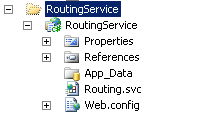
The svc file only contains the following entry which is very similar to a typical WCF web service except for the service model type.
<%@ ServiceHost Language="C#" Debug="true" Service="System.ServiceModel.Routing.RoutingService,System.ServiceModel.Routing, version=4.0.0.0, Culture=neutral,PublicKeyToken=31bf3856ad364e35" %>
The real business is in the web.config file below where the routing table and filters are defined. The key points are the routing and client endpoint sections which I will describe in more detail below.
<?xml version="1.0"?>
<configuration>

  <system.web>
    <compilation debug="true" targetFramework="4.0" />
  </system.web>
  <system.serviceModel>

    <serviceHostingEnvironment multipleSiteBindingsEnabled="true" />
    <services>
      <service behaviorConfiguration="RoutingBehavior" name="System.ServiceModel.Routing.RoutingService">
        <endpoint address="" binding="basicHttpBinding" bindingConfiguration=""
           name="MathRouter" contract="System.ServiceModel.Routing.IRequestReplyRouter" />
      </service>
    </services>

    <!-- Behaviour section -->
    <behaviors>
      <serviceBehaviors>
        <behavior>
          <!-- To avoid disclosing metadata information, set the value below to false and remove the metadata endpoint above before deployment -->
          <serviceMetadata httpGetEnabled="true"/>
          <!-- To receive exception details in faults for debugging purposes, set the value below to true.  Set to false before deployment to avoid disclosing exception information -->
          <serviceDebug includeExceptionDetailInFaults="false"/>
        </behavior>


        <!-- Routing behaviour-->
        <behavior name="RoutingBehavior">
          <routing routeOnHeadersOnly="true" filterTableName="filterTable1" />
          <serviceDebug includeExceptionDetailInFaults="true"/>
          <serviceMetadata httpGetEnabled="true" />
        </behavior>

      </serviceBehaviors>
    </behaviors>


    <!-- Routing section-->
    <routing>
      <namespaceTable>
        <add prefix="ha" namespace="http://www.examples.com/Adder/2010/10"/>
        <add prefix="hs" namespace="http://www.examples.com/Subtractor/2010/10"/>
        <add prefix="s" namespace="http://schemas.xmlsoap.org/soap/envelope/"/>
      </namespaceTable>

      <filters>
        <filter name="AddFilter" filterType ="XPath" filterData="/s:Envelope/s:Header/ha:Operation/text() = 'Add'"/>
        <filter name="SubFilter" filterType="XPath" filterData="/s:Envelope/s:Header/hs:Operation/text() = 'Sub'"/>
      </filters>

      <filterTables>
        <filterTable name="filterTable1" >
          <add filterName="AddFilter" endpointName="Adder" priority="0"/>
          <add filterName="SubFilter" endpointName="Subtractor" priority="0"/>
        </filterTable>
      </filterTables>
    </routing>


    <!-- Client endpoints for the services-->
    <client>
      <endpoint address="http://adderservice/adder.svc" binding="basicHttpBinding" bindingConfiguration="" contract="*" name="Adder"/>
      <endpoint address="http://subtractorservice/subtractor.svc" binding="basicHttpBinding" bindingConfiguration="" contract="*" name="Subtractor"/>
    </client>
  </system.serviceModel>


  <system.webServer>
    <modules runAllManagedModulesForAllRequests="true"/>
  </system.webServer>

</configuration>
Below is what the soap message looks like coming over the wire using MS WCF Test Client for the Adder web service.
<s:Envelope xmlns:s="http://schemas.xmlsoap.org/soap/envelope/">
  <s:Header>
    <Action s:mustUnderstand="1" xmlns="http://schemas.microsoft.com/ws/2005/05/addressing/none">http://EquateRequestMessage/Action</Action>
    <h:Operation i:nil="true" xmlns:i="http://www.w3.org/2001/XMLSchema-instance" xmlns:h="http://www.examples.com/Adder/2010/10" />
  </s:Header>
  <s:Body>
    <EquateRequestMessage xmlns="http://www.examples.com/Adder/2010/10">
      <Value1>0</Value1>
      <Value2>0</Value2>
    </EquateRequestMessage>
  </s:Body>
</s:Envelope>
In the routing section below I have used a namespace table to alias the namespace of the service contracts. Lines 2 and 3 are aliases for the WCF Services that I built. Line 4 is the default soap message namespace.
1: <namespaceTable>
2: <add prefix="ha" namespace="http://www.examples.com/Adder/2010/10"/>
3: <add prefix="hs" namespace="http://www.examples.com/Subtractor/2010/10"/>
4: <add prefix="s" namespace="http://schemas.xmlsoap.org/soap/envelope/"/>
5: </namespaceTable>
The other section of interest is the filters. Here I am using xpath queries to read the type of mathematical operation and depending on which filter matches, it will route to the correct endpoint as defined in the filter tables. Note that I am using the namespace aliases.
1: <filters>
2: <filter name="AddFilter" filterType ="XPath" filterData="/s:Envelope/s:Header/ha:Operation/text() = 'Add'"/>
3: <filter name="SubFilter" filterType="XPath" filterData="/s:Envelope/s:Header/hs:Operation/text() = 'Sub'"/>
4: </filters>
The filter tables determine which endpoint to reroute the message to.
1: <filterTables>
2: <filterTable name="filterTable1" >
3: <add filterName="AddFilter" endpointName="Adder" priority="0"/>
4: <add filterName="SubFilter" endpointName="Subtractor" priority="0"/>
5: </filterTable>
6: </filterTables>
These are the endpoint addresses for the WCF services that I had built.
1: <!-- Client endpoints for the services-->
2: <client>
3: <endpoint address="http://adderservice/adder.svc" binding="basicHttpBinding" bindingConfiguration="" contract="*" name="Adder"/>
4: <endpoint address="http://subtractorservice/subtractor.svc" binding="basicHttpBinding" bindingConfiguration="" contract="*" name="Subtractor"/>
5: </client>
Thats it, routing using a configuration file. This is just one example on using the new routing features in WCF 4.0.
Enjoy.


